Platform Overview
The purpose of the platform is to enable integration of modules with other modules, e.g. Licensing, Datacollection, etc. It enables sharing of information via messaging (publishing of and subscribing to messages) as well as exchange of data via storage (storage and retrieval of files). Shared file locations (URIs) are shared by embedding the locations in messages.
Platform API
The Platform API is used to integrate a module with the platform and thus to other modules, e.g. Licensing, Datacollection, etc. It handles messaging (publishing of and subscribing to messages) as well as exchange (storage and retrieval) of files.
Information on the configuration of the Platform API can be found here.
Module Integration
Integration between platform modules is achieved by way of a central platform that connects all the modules (via the Platform API) as depicted below:
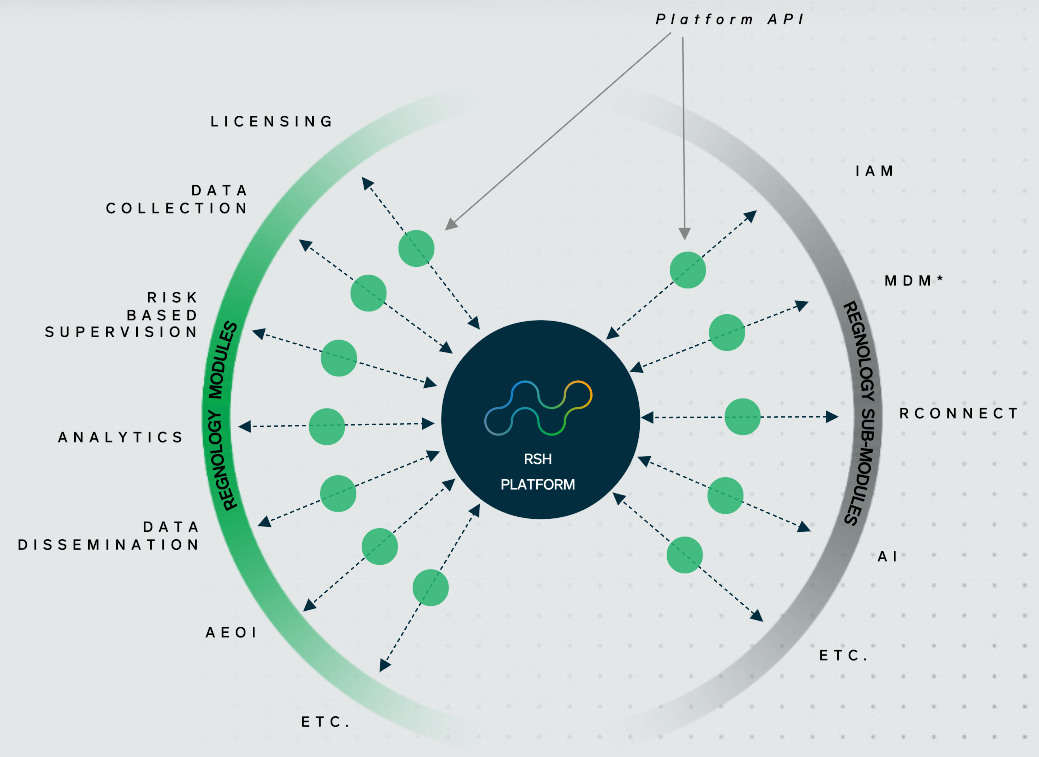
Until the finalization of a standalone master data management (MDM) module, Licensing or Datacollection need to role-play as the MDM module. This means that every RSH platform instance needs the Licensing or the Datacollection module in place. Where both are in place, Licensing should take priority in this regard.
Note: The above diagram depicts RSH as the context for platform (and indeed Platform API) use. However, this equally applies to any Regnology product, e.g. RRH, in that it has the same platform to connect modules to each other in the same way. It is just that the modules in question are different, i.e. not RSH modules; everything else is the same.
Messages (and optionally files) are shared between modules via the platform. Every module has its own Platform API instance to conform to the contracts that the platform specifies, i.e. act as the bridge between the module and the platform, and thus other modules.
Information is shared between modules by the platform on a publish/subscribe basis. It is this design pattern that enables modules to be plugged in and out independently, i.e. without breaking other modules.
Messages
The platform relays messages on a publish/subscribe basis between the modules.
Below is an example flow of a message between two modules. In the diagram, Module A is the publisher of the message and Module B is the subscriber.
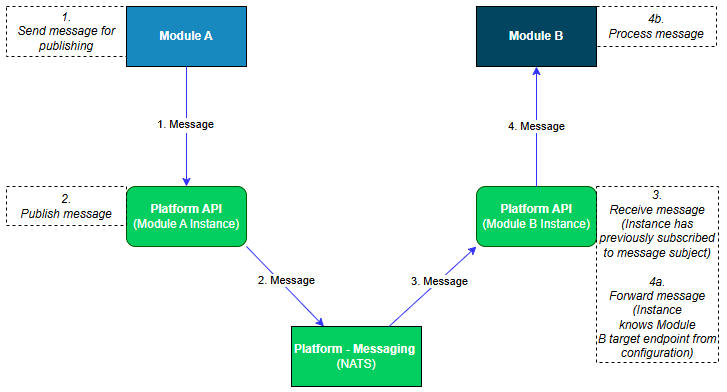
More information on messages/messaging can be found here.
Storage
The Platform API can also be used to store (and retrieve) files, typically with the intent of sharing them with other modules via a message with the file location (URI).
The file is saved to the file store, via the Platform API, by the relevant publishing module. Below is an example flow of a message between two modules where a file is also being shared. In the diagram, Module A is the publisher of the message and Module B is the subscriber. Note that as a message can contain links to multiple files, the steps to store/retrieve a file can be repeated multiple times, before/after the message is sent/received.
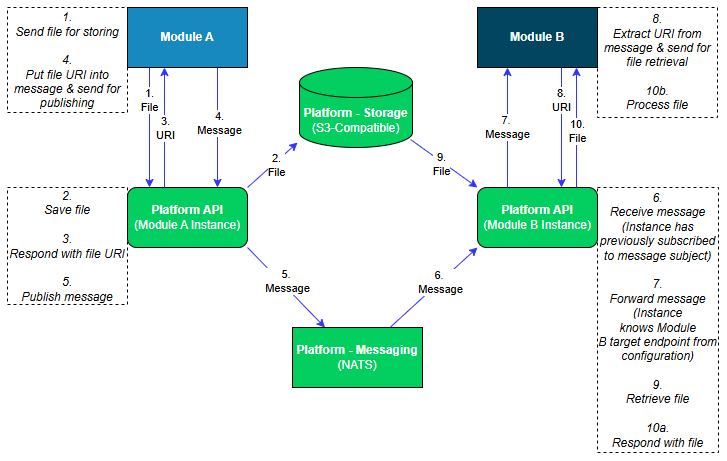
More information on storage can be found here.
Underlying Technologies
The technologies underpinning the platform are NATS for messaging and a configurable file-storage backend. The Platform API supports S3-compatible storage, Azure Blob Storage, Azure Data Lake Storage Gen2 and a shared folder. Modules use the same Platform API regardless of the backend. Configuration for each backend is described in Platform API Storage Configuration.
More information on NATS can be found here . However, as mentioned, the Platform API obscures the underlying technologies from the modules.
More information on MinIO, an example of S3-compatible storage, can be found here . However, as mentioned, the Platform API obscures the underlying technologies from the modules.
Installation
For guidance on how to install the platform, see the platform installation documentation here.
Configuration
To configure the platform, see the platform Helm chart documentation here.
To configure the application, set the below environment variables or application settings. Environment variables take precedence over application settings. Note that typically these settings should be set via the values file in the relevant Helm chart for the module using an instance of the Platform API, so one should defer to that over the below.
-
Application ID
- Environment variable:
RHP_APPLICATION_ID - Application Setting:
rhpApplicationId - Description: This setting should be set to a unique and consistent application name, e.g.
DataCollectionModule. This setting is mandatory as it is used to ensure it ignores messages published by itself.
- Environment variable:
-
Messaging Mode
- Environment variable:
RHP_MESSAGING_MODE - Application Setting:
rhpMessagingMode - Description: The Platform API integrates with the platform for messaging. To do this, set this value to
NATSor leave blank. This will indicate that the platform messaging technology to interface with is NATS. Alternatively, in exceptional cases, the file system can be used for platform messaging, so messages are exchanged/published as JSON files via a shared folder. To do this, set this value toFileSystem.
- Environment variable:
-
Messaging URL
- Environment variable:
RHP_MESSAGING_URL - Application Setting:
rhpMessagingUrl - Description: If the messaging mode is
NATS, then add the NATS URL here, e.g.nats://nats.nats.svc.cluster.local:4222,nats://host.docker.internal:4222,nats://localhost:4222. If the messaging mode isFileSystem, then add the shared folder location here, e.g.Z:\rhp,/app/rhp. This will be the shared location for the Platform API to publish messages to or pick up subscribed-to messages.
- Environment variable:
-
Subscriptions
- Environment variable:
RHP_SUBSCRIPTIONS - Application Setting:
rhpSubscriptions - Description: If you wish the Platform API to subscribe to messages, then add the message subjects here. Multiple message subjects can be added separated by commas, e.g.
hub.entity,hub.entitygroup,hub.submission.
- Environment variable:
-
Subscriptions URL
- Environment variable:
RHP_SUBSCRIPTIONS_URL - Application Setting:
rhpSubscriptionsUrl - Description: The endpoint URL in the owning/calling module to forward to with any incoming subscribed-to messages, e.g.
https://localhost/analytics/v1/messaging/receive.
- Environment variable:
-
Subscriptions URL Headers
- Environment variable:
RHP_SUBSCRIPTIONS_URL_HEADERS - Application Setting:
rhpSubscriptionsUrlHeaders - Description: Optional array of headers to include in the request to the subscriptions URL, e.g.
[ { "key": "<some header name>", "value": "<some header value>" } ].
- Environment variable:
-
Storage Mode
- Environment variable:
RHP_STORAGE_MODE - Application Setting:
rhpStorageMode - Description: The Platform API integrates with the platform for storage, i.e. sharing of files. Set this value to
S3Compatibleor leave blank for S3-compatible storage (for example Google Cloud Storage, Amazon S3, MinIO, Ceph). Set it toAzureBlobfor Azure Blob Storage,Adlsfor Azure Data Lake Storage Gen2, orFileSystemfor a shared folder. Azure modes authenticate with Microsoft Entra Workload Identity.
- Environment variable:
-
Storage URL
- Environment variable:
RHP_STORAGE_URL - Application Setting:
rhpStorageUrl - Description: If the storage mode is
S3Compatible, then add the S3-compatible API storage URL here, e.g.http://minio.minio.svc.cluster.local:9000,http://127.0.0.1:9000,https://storage.demo.regnology.io. Note: If using SSL, then the URL must begin withhttps://.... If the storage mode isFileSystem, then add the shared folder location here, e.g.Z:\rhp,/app/rhp. Azure uses the dedicated endpoint setting below. Please also see the previous section documentation on Storage Locations.
- Environment variable:
-
Storage Bucket
- Environment variable:
RHP_STORAGE_BUCKET - Application Setting:
rhpStorageBucket - Description: If the storage mode is
S3Compatible, then add the S3 bucket name here, e.g.rhp. For Azure storage, use the dedicated container setting below. If the storage mode isFileSystem, then this setting is ignored.
- Environment variable:
-
Azure Storage Container
- Environment variable:
RHP_AZURE_STORAGE_CONTAINER - Application Setting:
rhpAzureStorage:container - Description: If the storage mode is
AzureBloborAdls, then add the Blob container or ADLS filesystem name here, e.g.rhp. This setting is required for those modes.
- Environment variable:
-
Azure Storage Endpoint
- Environment variable:
RHP_AZURE_STORAGE_ENDPOINT - Application Setting:
rhpAzureStorage:endpointUrl - Description: If the storage mode is
AzureBloborAdls, then add the full Azure endpoint URL here, e.g.https://myaccount.blob.core.windows.netorhttps://myaccount.dfs.core.windows.net. A private endpoint URL is equally valid. The host from this URL is also written into the generatedwasbs://andabfss://file URIs. This setting is required for those modes.
- Environment variable:
-
Storage Username
- Environment variable:
RHP_STORAGE_USERNAME - Application Setting:
rhpStorageUsername - Description: If the storage mode is
S3Compatible, then add the S3-compatible storage username here, e.g.admin,minioadmin. Ignored for Azure and filesystem modes.
- Environment variable:
-
Storage Password
- Environment variable:
RHP_STORAGE_PASSWORD - Application Setting:
rhpStoragePassword - Description: If the storage mode is
S3Compatible, then add the S3-compatible storage password here. It is recommended to use an environment variable if running in production and to secure the password, e.g. Kubernetes secret. Ignored for Azure and filesystem modes. Helm chart values, includingapi.storage.existingSecretand the Azure Workload Identity fields, are in Platform API Storage Configuration.
- Environment variable:
Note: Messaging behavior is configured in the platform configuration (not the Platform API configuration), so please refer to that for messaging settings. However, typically, where the messaging platform is NATS, it is configured as follows:
- Storage type:
file - Storage size:
1GBper stream, i.e. per message subject - Discard policy:
Old, i.e. old messages are removed to make way for new ones if limits are reached - Retention time:
30 days(unless discarded for space) - Max messages:
1000per stream - Max message size:
1MB
The Platform API has the following behavior for receipt of messages from the platform, i.e. consumption.
This only applies if the Messaging Mode is configured to be NATS:
- Acknowledgement policy:
Explicit, i.e. it will acknowledge receipt of each message it successfully processes, i.e. passes on to its target module - Acknowledgement wait time:
30s, i.e. time to wait for acknowledgement before retrying delivery - Delivery policy:
All, i.e. deliver all available messages. For example, if the module was down for a period of time, once back online, it will deliver all missed messages that it still has stored. - Max acknowledgement pending:
1000, i.e. the maximum number of messages without acknowledgement before suspension - Max deliver:
Unlimited, i.e. attempt delivery until an acknowledgement is received - Replay policy:
Instant, i.e. re-deliver sets of missed messages as fast as possible, no gaps in between each
Deployment Options
The platform is normally deployed in a Kubernetes cluster and as such has a Helm chart to enable that. However, it is also possible to run the platform in a server environment, i.e. on servers/virtual servers. This is for the use case where some modules are already running in that type of environment and wish to include more modules (thus needing the platform to integrate them) and are not yet ready to move to a cluster.