File Storage
The platform API can also be used to store (and retrieve) files, typically with the intent of sharing them with other modules.
Storage Locations
Within the configured storage folder/bucket files will be stored in sub-folders according to their type, e.g. an XML data file in a data folder, an XSD definition for the data file in a data-schema folder.
| File Type | Sub-Folder | Description |
|---|---|---|
| data | data | A data file |
| data-schema | data-schema | A definition file for a data file |
| data-mapping | data-mapping | A mapping file, e.g. for mapping facts to locations |
| entity-data | entity-data | An entity data file |
| entity-schema | entity-schema | A definition file for an entity data file |
| other | other | A general file |
Consumers may create/use their own custom types also. There are no restrictions on this set, though any unsupported characters (those that cannot be used in folder names) will be replaced by an underscore ’_’.
Finally, the platform API can also retrieve files from external storage.
See the uri element descriptions in the Message Types standards for more information.
Publish Files
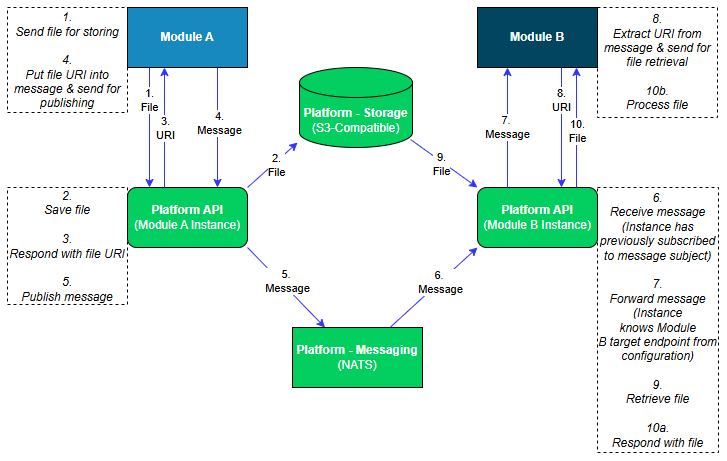
To share a file you store it in platform storage (or an external storage location) and publish a message with a link (URI) to the file in a message. Thus, you first use the platform API to save it to the platform file store. The platform API stores the file in the configured bucket, container, or filesystem, and places it in a folder named after the file type. The default S3 bucket is rhp. The platform API will generate/provide a path/URI to the file which is needed by any consumer to retrieve the file. Therefore, the URI and file type should be included in the relevant element(s) of the message payload for any message subscribers to use to retrieve the file. Then the platform API is used again to publish the now completed message, i.e. complete with file URI.
It is the standard to use the element uri with a scheme that matches the configured platform storage provider.
Examples:
- S3-compatible (default):
s3://rhp/data/2025-0207-11e5-a6e7.1.csv - Azure Blob Storage:
wasbs://rhp@myaccount.blob.core.windows.net/data/2025-0207-11e5-a6e7.1.csv - Azure Data Lake Storage Gen2:
abfss://rhp@myaccount.dfs.core.windows.net/data/2025-0207-11e5-a6e7.1.csv
It is also standard to provide any schema/definition file that may be required to understand the structure of the file using an appropriate file type, e.g. data-schema or data-mapping. Finally, as mentioned, it is standard that the sub-folders are named after the type of file being stored.
The host in a wasbs or abfss URI must match the configured endpoint. Provider parameters, credentials and identity setup are described in Platform API Storage Configuration.
The file is saved to the file store, via the platform API, by the relevant publishing module. Below is an example flow of a message between two modules where a file is also being shared. In the diagram Module A is the publisher of the message and Module B is the subscriber. Note that as a message can contain links to multiple files, the steps to store/retrieve a file can be repeated multiple times, before/after the message is sent/received.